
Jev Ultrafast: the AI agent that clicks for you.
A free extension for Chrome and Edge. You type a goal, and the AI model you chose carries out the steps on the page by itself.
Scroll and the demo plays step by step.
Add the extension and open the panel.
Click “Add to Chrome”, pin the Jev icon and click it. The side panel opens on the right and stays open while you move between pages.
Chrome and Edge 116+ · 0 PLN · no account
You choose an AI model and paste your key.
Claude, OpenAI, OpenRouter, Groq, DeepSeek or a local model in Ollama or LM Studio. The API key stays on your computer.
Local model = no key and no cloud
You describe the task in plain words.
For example: “Find a one-way flight from Zurich to London on 15 October and open the cheapest result.” Then you click Start.
One sentence is enough
One model decision per step.
The agent numbers the page elements. In each step the model picks one action: click, type, select, scroll, wait or finish.
In this demo: 6 actions and 7 model calls
Status done and a full log of actions.
The panel shows every step: the operation, the element, the model's confidence and the page change. Stop halts the run at any moment.
Always check the result yourself
Install it and try it out.
Below you will find the full 6-step guide, the list of models, rules for safe use and answers to the most common questions.
Free · no account · open source (MIT)
In short
Jev Ultrafast Agent is a free extension for Chrome and Edge that carries out tasks on websites using the AI model you choose. The agent reads the page as a numbered list of elements, and in each step the model picks one action: click, type, select, scroll, wait or finish. It works with Claude, OpenAI, OpenRouter, Groq, DeepSeek, local models in Ollama and LM Studio, and with TypeSafe Jev. Installing it and running your first task takes about 5 minutes.





One decision per step. Zero guesswork.
Jev is a port of the open-source jev-ultrafast project (browser-use), moved entirely into the browser: no Python, no server and no extra tools.
Reads the page as a list
Instead of screenshots, the agent sees numbered interactive elements, e.g. “[1] From field”, “[5] Search button”, plus the visible text of the page.
One typed decision
The model returns one operation, an element number and, if needed, text. One step is one model call, so the whole run is fast and light on tokens.
Checks before it clicks
The action hits exactly the element the model saw. If the page has changed in the meantime, the agent reads it again instead of clicking blindly.
How to install and use Jev Ultrafast.
You need Chrome or Edge version 116+ and an API key from the model provider you choose, or a local model in Ollama.
Install the extension
Open the Jev Ultrafast Agent page in the Chrome Web Store and click Add to Chrome. In Microsoft Edge, first turn on Allow extensions from other stores on the
edge://extensionspage.Developer version: download the ZIP package, unzip it, go to
chrome://extensions, turn on Developer mode and choose Load unpacked.Pin the icon and open the side panel
Click the puzzle icon in the browser toolbar and pin Jev Ultrafast. Clicking the icon opens the side panel on the right of the window. The panel stays open as you move between pages.
Choose an AI model and paste your API key
In the Decision model section, choose a provider, paste your own API key and click Save settings. The default model for Claude is
claude-opus-5; a faster and cheaper one isclaude-haiku-4-5.A local model (Ollama, LM Studio) needs no key. The key stays only on your computer, in
chrome.storage.local.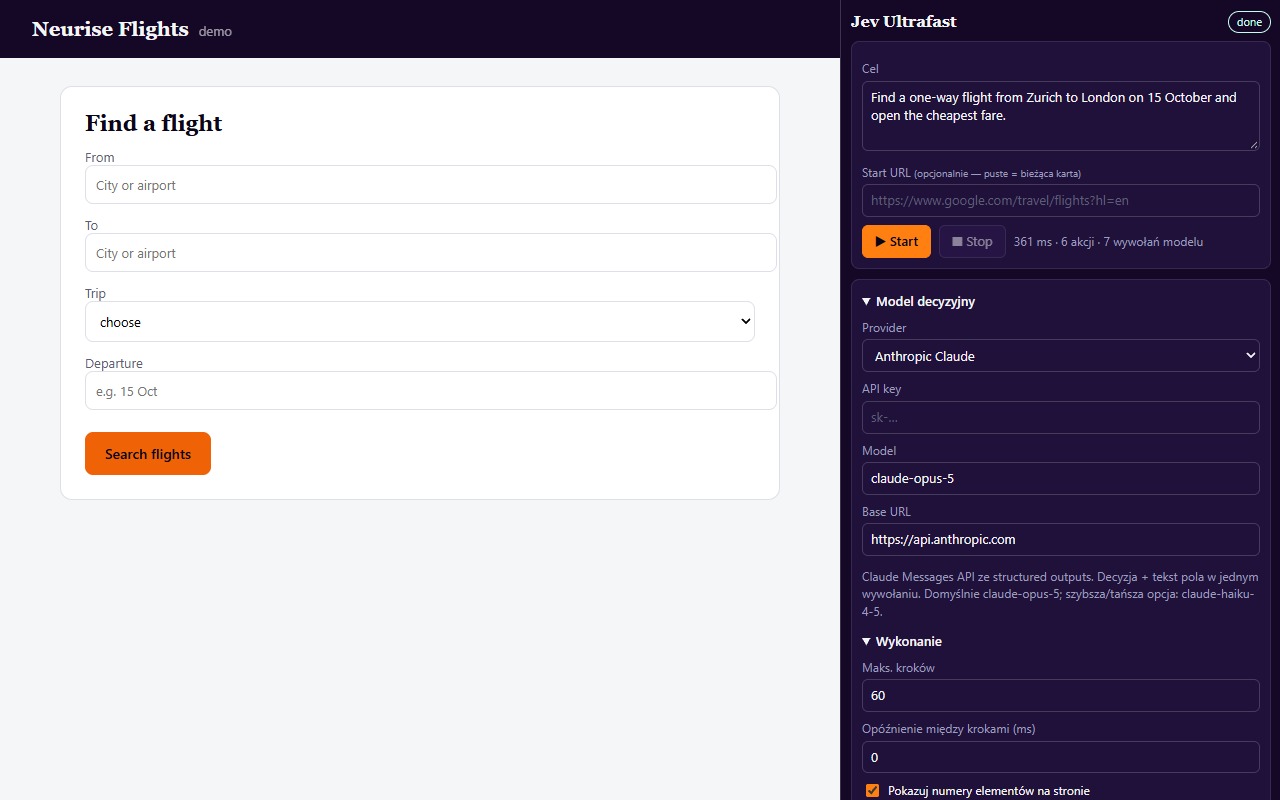
Side panel: decision model and execution settings Open the page and type the task goal
In the active tab, open the page where the agent should work, or type the address in the Start URL field. In the Goal field, describe the task in plain words, e.g. “Find a one-way flight from Zurich to London on 15 October and open the cheapest result.” Click Start.
Watch the agent work step by step
Element numbers appear on the page, and the panel shows a step log: the operation, the element, the model's confidence and whether the page changed. In each step the model picks one action:
CLICK,TYPE_TEXT,SELECT,SCROLL,WAIT,DONEorBLOCKED.The Stop button halts the run at any time.
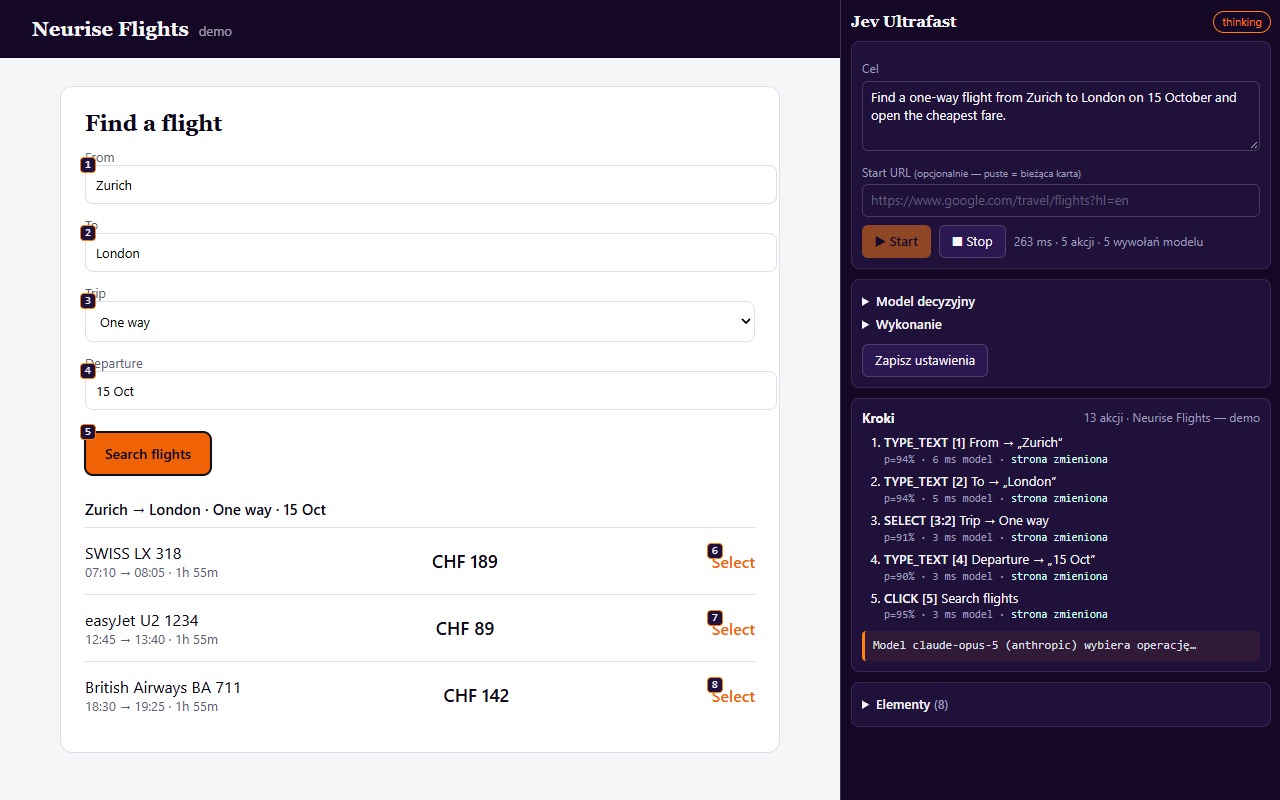
Agent during a task: element numbers and step log Check the result
Status
donemeans the model considers the task complete. Always check the result on the page - the model's decision is not proof. Statusblockedmeans the agent sees no way forward or three actions in a row changed nothing. In that case, make the goal more specific and run it again.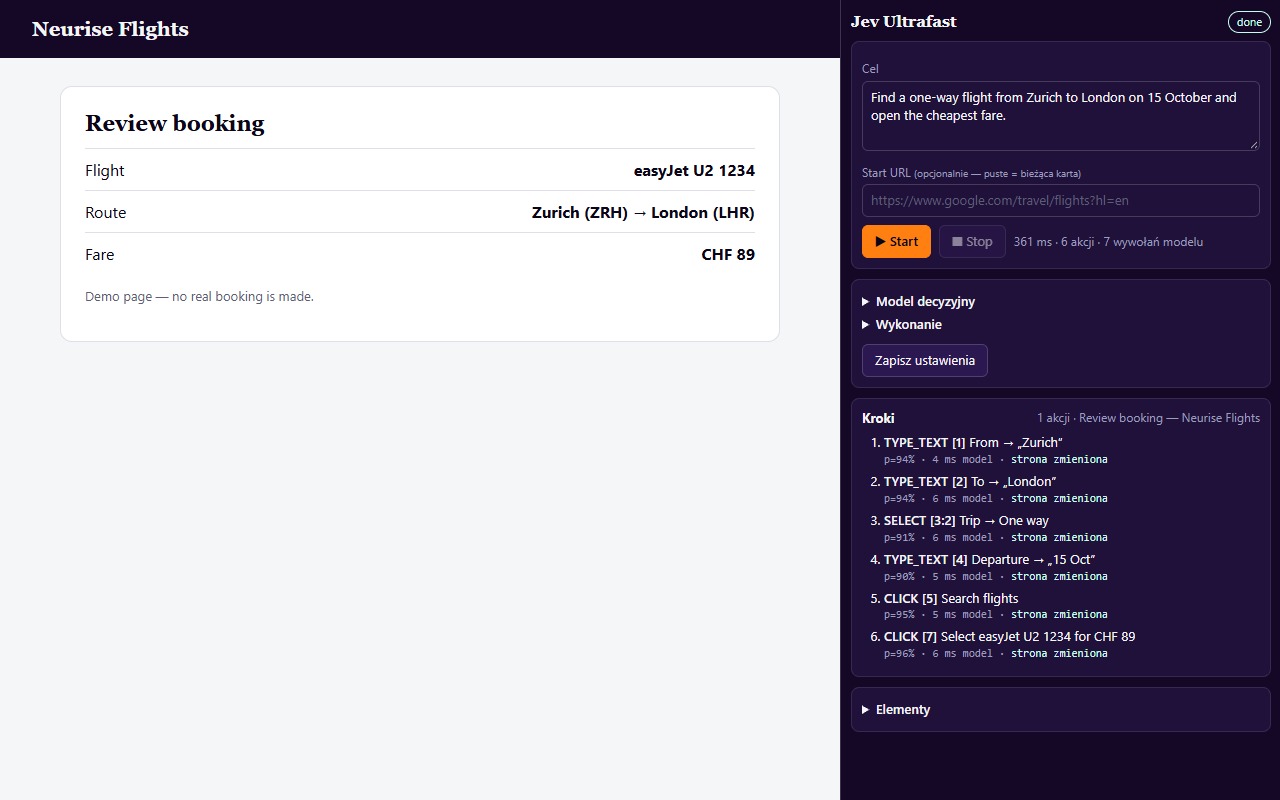
Finished: status done and the full action log
Your model, your key.
You choose the provider in the side panel. The extension connects directly to its API, without going through Neurise.
| Provider | API key | When to choose it |
|---|---|---|
| Anthropic Claude | yes | claude-opus-5 (accurate), claude-haiku-4-5 (fast). Structured outputs, decision and text in a single call. |
| OpenAI | yes | gpt-5-mini by default; any model with JSON support. |
| OpenRouter | yes | Hundreds of models under one key, e.g. anthropic/claude-sonnet-4.6. |
| Groq | yes | Very low latency for open models. |
| DeepSeek | yes | deepseek-chat, OpenAI-compatible API. |
| Ollama (local) | no key | A model on your computer, e.g. qwen3:8b. Your data does not go to the cloud. |
| LM Studio (local) | no key | Local server from the Developer tab. |
| Custom endpoint | optional | Any OpenAI-compatible server, with an address ending in /v1. |
| TypeSafe Jev | yes | The original typed-decision protocol with calibrated probabilities. Needs a separate model for typing text. |
The agent acts on your behalf. You supervise.
Passwords and payments
Handle logins and payments yourself. Password fields are skipped, and the agent should not confirm payments or send personal data.
Page content is not a command
A page may contain hidden instructions for AI (prompt injection). Jev treats page text as data, but watch the step log and stop the run with the Stop button.
Your keys stay with you
The API key is stored locally and sent only to the provider you chose. Details in the privacy policy.
Trusted events (CDP)
An optional mode for pages that ignore ordinary clicks. The browser then shows a debugging bar. The mode is off by default.
Frequently asked questions
Jev Ultrafast Agent is a free extension for Chrome and Edge that carries out tasks on websites: it fills in forms, clicks, selects options and moves between pages. It is driven by an AI model that you choose and connect with your own API key.
Yes, the extension itself costs 0 PLN and needs no account. You only pay the model provider for API usage, according to its pricing. With a local model in Ollama or LM Studio, the API cost is 0 PLN.
For tasks that need precision, choose Claude (claude-opus-5). For quick and cheaper tasks: claude-haiku-4-5 or gpt-5-mini. If you do not want to send data to the cloud: a local model in Ollama, e.g. qwen3. The model must be able to return its answer in JSON format.
Jev reads the page as a numbered list of interactive elements plus the visible text, without screenshots. The model returns one typed decision per step: the operation, the element number and, if needed, text. As a result, one step is one model call, and the action hits exactly the element the model saw.
The API key stays on your computer and goes only to the model provider you chose. The extension has no server of its own and no analytics. The model receives the address, title and visible text of the active tab plus the list of its elements, never password fields, file fields or hidden fields.
It should not, and it is not designed for that. Password fields are skipped, so the agent will not type a password. Handle logins, payments and sending personal data yourself, and leave the repetitive steps to the agent.
Google Chrome and Microsoft Edge, version 116 or newer. Other Chromium-based browsers may work, but they have not been tested.
Yes. Choose Ollama, LM Studio or “Custom OpenAI-compatible” and enter an OpenAI-compatible address ending in /v1. Local models do not need an API key.
Click Stop, make the goal more specific and run it again. The agent stops by itself after three actions that changed nothing, and after 60 steps. We describe typical problems and their solutions on the Help page.
The extension was created by @miuoshek and is published by Neurise, an SEO and GEO agency. Jev is a port of the open-source jev-ultrafast project (browser-use, MIT licence), moved entirely into the browser.
Creator and publisher
Want AI to recommend your brand?
AI agents and assistants increasingly make choices on the customer's behalf. Check how ChatGPT, Gemini and Perplexity describe your company.